
Sunday, April 11, 2010
Linux Discoveries #1: Obtaining Information of Installed Packages
Problem: What is the version of the installed PHP or PostgreSQL?
Solution: Remotely log on into the server and execute yum info PHP or yum info postgresql.

Thursday, March 11, 2010
MS Excel PS #2: Insert a Carriage Return/Line Feed in a Cell
Problem: In an Excel Sheet cell you are typing a two paragraph text but when you hit enter key to supposedly continue encoding the next paragraph the cursor instead went to the next cell.
Solution: Use Alt+Enter. Simple, eh?
Monday, March 1, 2010
DNS Resolver Cache
Problem: Our Firewall was having issues and our network guys applied some fix. Now, when I try to access our subversion server I'm receiving a 'cannot resolve host name' error message.
Solution: Fire up the command prompt and execute ipconfig /flushdns. Simple, eh?
Thursday, February 11, 2010
Sunday, January 24, 2010
WAMP Discoveries #1
Problem: Have you ever encountered Internal Server Error at WAMP?
 The last statement really has something to say. The server error log can be found at wamp\logs folder with apache_error.log filename. At the end of the file content you can find the latest server error entry, similar to the following:


For this particular case, there was an invalid command 'RewriteEngine' found at .htaccess file.
Solution:
Locate the httpd.conf file. With WAMP it is located at wamp\bin\apache\Apache2.2.11\conf folder.
Using your favorite text editor, locate the line
- #LoadModule rewrite_module modules/mod_rewrite.so
Remove the # symbol in the beginning of this line and Save the file.
Restart the All Services of the WAMP server.

That's about it.
Thursday, January 7, 2010
Internet Explorer Discoveries #1
Problem: When I'm accessing a website with a login box, the Internet Explorer (IE) browser is asking me:
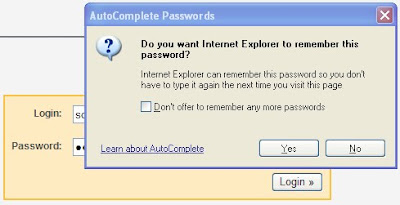
We can turn it off right there and then by ticking the checkbox "Don't offer to remember any more passwords". However, how do you turn it on later?
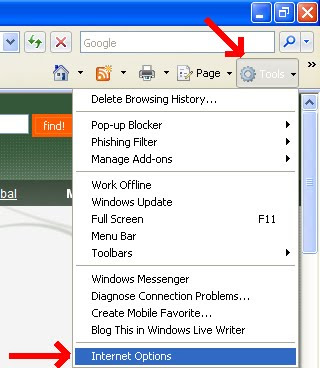
Solution: Navigate Tools > Internet Options.
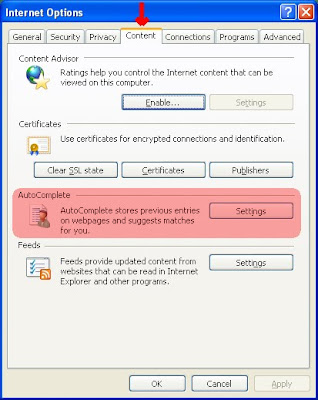
In the Internet Options Dialog, open the Content tab, and click on the Settings button in the AutoComplete section
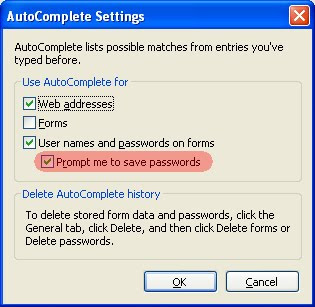
In the AutoComplete Settings Dialog tick the checkbox "Prompt me to save passwords". Hit OK button to save the settings.

We can turn it off right there and then by ticking the checkbox "Don't offer to remember any more passwords". However, how do you turn it on later?
Solution: Navigate Tools > Internet Options.

In the Internet Options Dialog, open the Content tab, and click on the Settings button in the AutoComplete section

In the AutoComplete Settings Dialog tick the checkbox "Prompt me to save passwords". Hit OK button to save the settings.

Wednesday, January 6, 2010
T-SQL Discoveries #1
Given: A database table with the following structure

Problem: How many of each subject were posted on a certain date?
Solution: Issue the following query
SELECT count(queueID) AS TotalCount, dateposted, subject FROM (SELECT queueID, CONVERT(DATETIME,postdate,111) AS dateposted, subject FROM tblQueue) AS tblQ GROUP BY dateposted, subject
NOTE: The above query disregards the posting time, i.e., it focuses on the date alone.
Subscribe to:
Posts (Atom)